
Testing the survey before starting it
After constructing the questionnaire, it is worth checking it for the correct order of questions or pages, catching "typos" and other errors. It is also worth checking the content of the questions and the correctness of redirects between pages/answers. This is also a great opportunity to look at the created questionnaire from the perspective of the respondent.
A test completion of the survey therefore allows you to avoid shortcomings and imperfections in the created survey, demonstrating the professionalism of the researcher.
How to finally check the correctness of my survey?
After finishing the creation of the survey (i.e., after adding all questions, setting their order, redirects between them, etc.), click "Creation", and then "Survey preview". Next, choose which device view you would like to test. This will open the created questionnaire.
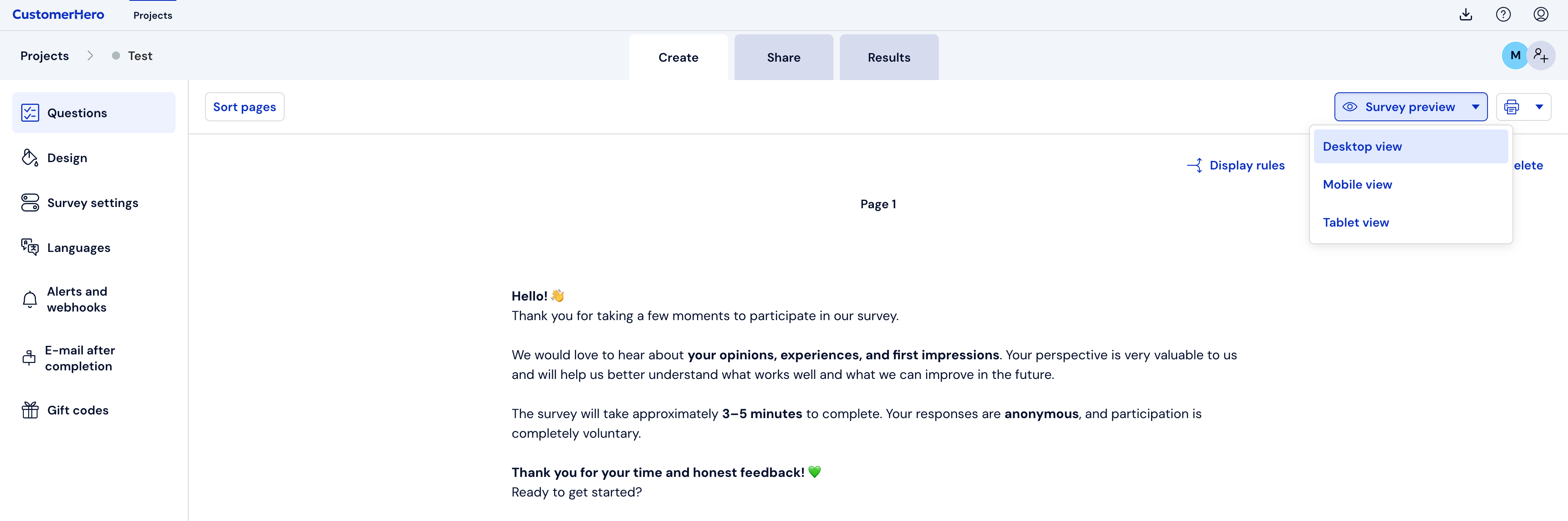
When we have more than one page of the survey, after selecting the device, we will also be able to indicate the page number from which we want to start.
Fill out the questionnaire (it is necessary to select all answers that were marked as required answers when creating the survey) and click Submit.
To return to editing the current survey in order to correct errors caught during its completion, click on the "Creation" tab.
Correct the places where you made a mistake.
What is worth remembering?
After a test completion of the survey, the results collected in this way are not saved in the aggregated results of the survey.
Checking correctness is a very important procedure, as it allows you to avoid mistakes and increase the survey's friendliness for respondents.
Checking the survey's correctness should be done before starting to collect results, however, we can also perform this procedure when the survey is active, as well as after the collection of results has ended (if we would like, for example, to use the survey in subsequent studies).
A test completion can only be done by a person logged into the management panel. If you want to send the survey for testing to a third party, you must send them a link to the survey. (See how)