
How to make a fun-to-complete questionnaire?
You've probably often wondered what to do, how to create a questionnaire so that respondents are more willing to fill it out. So that answering questions is not tiring and the number of abandoned surveys during completion is close to zero.
There are many ways to do this. Some are better, some are worse, but it's definitely worth trying them out and experimenting. In this post, I would like to tell you about one very simple method that significantly improves the respondent's experience while completing a survey. It is nothing else than dividing the questionnaire into subpages. It is much easier for respondents to complete tasks that are small. As they say, "quick and easy, done". Exactly, this feeling of completing something, closing a topic, gives a lot of satisfaction and motivation to complete other similar tasks.
A large questionnaire
Surely someone will now say "Well, okay, but what if my questionnaire is large?" – no problem. Let's go back for a moment to the previous paragraph – people like to complete small portions of tasks. So if your form is long, divide it into smaller pieces. Just like books are divided into chapters and newspaper articles into columns. Large tasks must always be broken down into smaller pieces, because it is impossible to complete one large task in one sitting. It's much easier to complete small pieces.
So let's return to our questionnaire. If your survey contains many questions, divide it into pages. Just click the "ADD PAGE" button below the questionnaire:
and you're done! You can create more questions on subsequent pages.

"What if my questionnaire is already prepared?"
No problem, add as many pages as you need and then use the sorting mechanism to move the questions to the target pages. Question sorting also works between pages, so you can use this mechanism not only to sort questions within a single page, but also to move questions between pages.
To enable sorting/moving questions between pages, click the "QUESTION SORTING" button:

Number of questions per page.
For the respondent to feel that they are completing the survey quickly, there should be two to three questions on one page. In exceptional situations, you can add more questions, but they must be strongly related thematically. If you use matrix questions, the situation is slightly different. In this case, it is best to create only one such question per page. Why? Because matrix questions are condensed single or multiple-choice questions. Visually they are different questions, but really, from a research and technological point of view, they are nothing more than several similar questions arranged in a matrix.
Progress bar
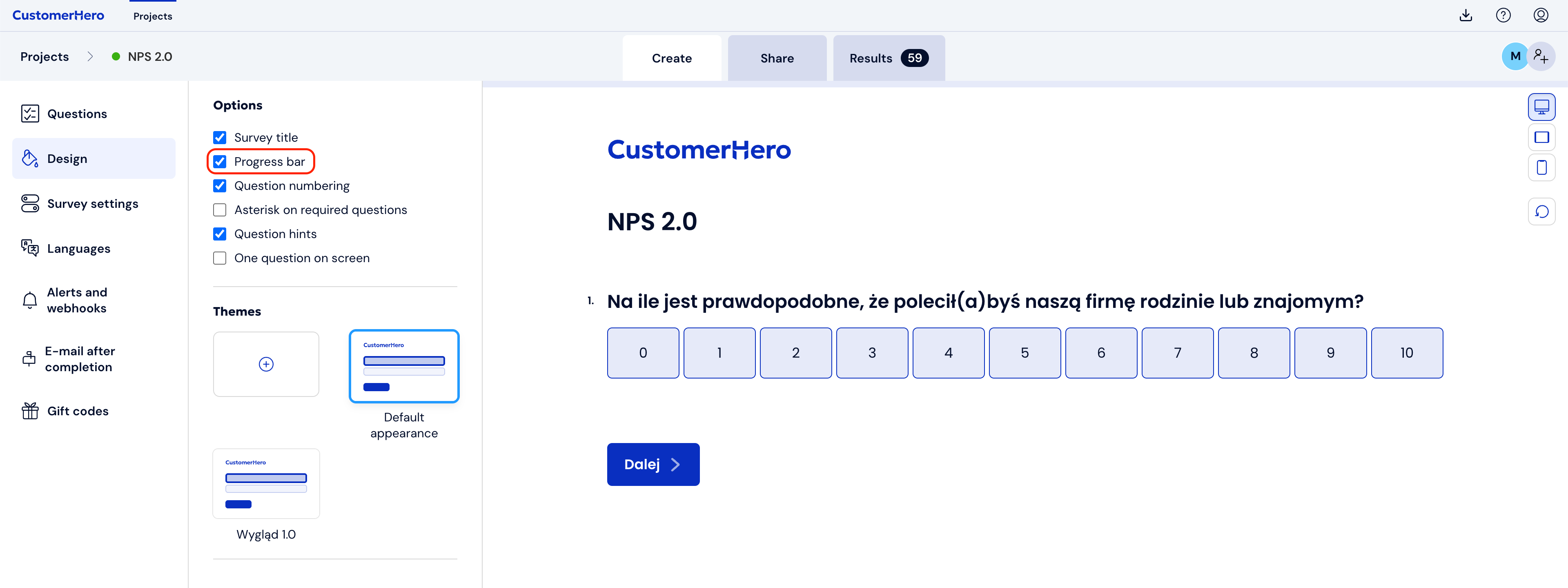
Dividing the questionnaire into pages brings one more benefit. In your survey, you can enable the display of a progress bar, thanks to which your respondents will know how many tasks are behind them and how many are still ahead. To turn on the progress bar, go to editing the survey appearance in the APPEARANCE tab. And then check the Progress bar option. At the top of the screen, along with transitions to subsequent pages, a bar will appear that will tell us about the progress in filling out the survey.
My questionnaire is exceptionally long
Really big things can also be divided into smaller ones. I have never encountered a task that could not be divided into smaller tasks. The same goes for your questionnaire.
In the introduction, write down what thematic blocks your questionnaire consists of. Determine how many questions or pages each block contains. Name these blocks and then, at the beginning of each of them, add a page with only one descriptive block that will inform the respondent that they have finished filling out one block and are moving on to the next. Simple, right?