
Can I restore a deleted question?
You were creating a survey and wanted to delete an unnecessary question, but instead you deleted the wrong one? Nothing is lost! Fortunately, in Webankieta you don't have to create it from scratch – we can restore it for you.
How to recover a deleted question?
Contact our Support department – you can do this:
via the chat available in the panel,
by sending a message to contact@customerhero.com.
In the message, provide:
the email address assigned to your account,
the survey title,
the content of the question you want to recover.
Our team will take care of the rest and restore the question to its place.
What happens to the data after deleting a question?
It is worth remembering that deleting a question is a permanent action and causes the deletion of all answers collected so far for this question. So if you want to keep historical data and at the same time introduce a new question or new answers, we propose the following solution:
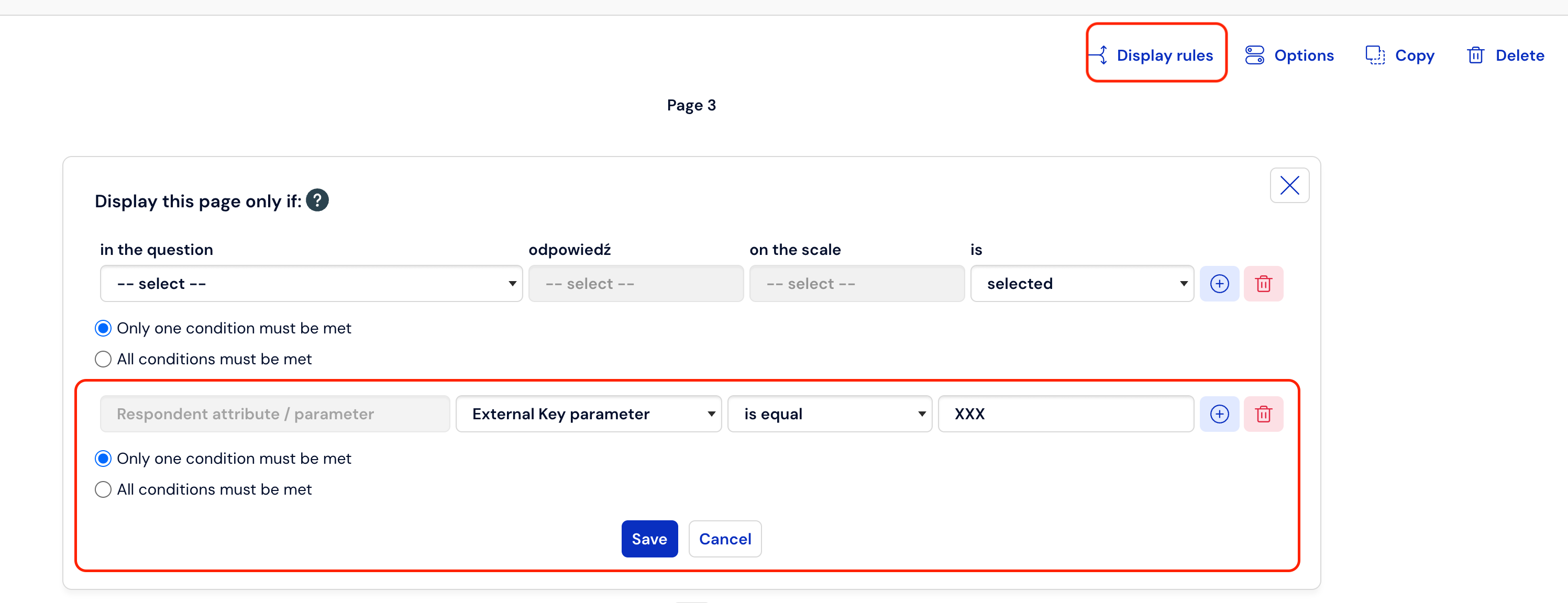
Hiding an existing question
Place this question on a separate survey page.
Set a display rule so that this page is visible only under a specific condition that will not be met (e.g.,
external_key = xxx).Thanks to this, historical data will remain in the results, but respondents will no longer see this question.
Adding a new question
Place the new question or modified answers on a new page.
From this point on, respondents will choose from the new list, and the old data will remain intact.
How to avoid similar situations?
Before you delete a question, check if you don't want to keep the current results.
For major changes, you can copy the survey and work on the copy.
When in doubt – contact our support before you decide to delete a question.