
Extensive ANS_ macros
When creating a questionnaire, the content of a survey invitation, or an email sent after its completion in the CustomerHero tool, it is possible to modify automatically generated content and adapt them into more personalized messages.
Additionally, CustomerHero allows you to set different versions of messages that can be displayed depending on the answers provided by respondents.
In order to introduce such personalized information, you must use the Dynamic content (macros) function. In the article in the Webankieta guide, you can find information about available macros and knowledge about where they are available and how to use them. This entry, however, will focus on one of the macros – the extended ANS_.
How to insert dynamic content using the ANS_ macro?
Dynamic content can be inserted in a very simple way. There are two ways: using the content editor and selecting the correct element from the "Dynamic content" drop-down menu.
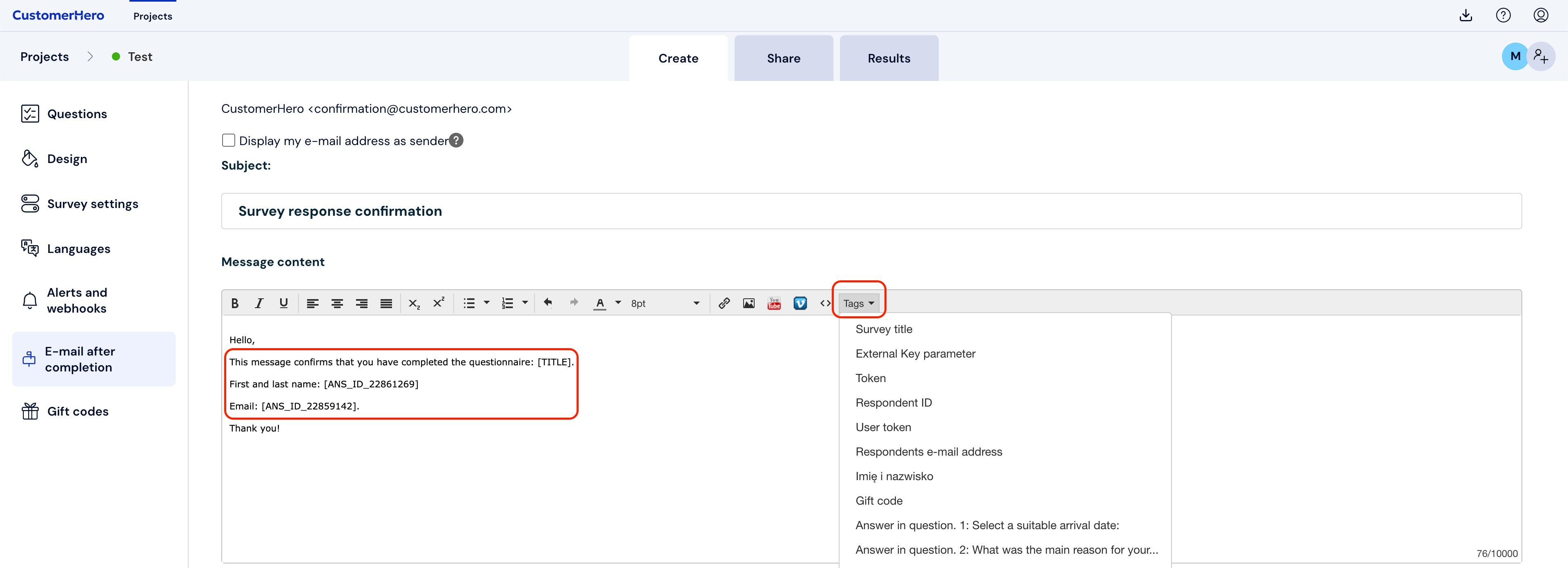
Another way is to type the macro name directly into the content, e.g., [ANS_ID_12998] or [ANS_ID_1233.1]. This option is especially useful when in a given place (where we want to insert macros) there is no possibility of advanced content editing (e.g., question content).
Using the ANS_ macro, it is possible to dynamically insert the question content, the answer content provided on a previous page, or the message content of the answers the respondent provided in the completed survey. Currently, the ANS_ macro is available for the following types of questions: single-choice, multiple-choice, form, drop-down list, open-ended, form, question about email, number, and date.
ANS_ should be inserted using the drop-down list in: "Dynamic content" in the advanced editor (this was presented in the graphic above).
Note: please remember that macros of the ANS_ID_* type do not work in the widget. In the case of the widget, the working macros are the older implementation of macros, i.e., [ANS_*nr*], where nr is the question number.
What can you use ANS_ macros for – use cases
Depending on the type of macro:
ANS_* – allows inserting the selected answer into the content of questions, answers, alerts, or reports.
ANSC_*- as above, but in the case of a multiple-choice question, the answers are separated by a vertical bar character “|” instead of a comma.
ANSX_* – allows inserting an answer into a Webhook type alert and setting up a redirection to a URL address after completing the survey. The macro then substitutes the answer without Polish characters, spaces are replaced with underscores (_).
ANSU_* – as above, but additionally the answer is passed through the urlencode function – preparation for sending the answer as a GET parameter in the URL address.