
Random page display
To make the survey more varied and ensure the reliability of responses in your survey, you can use the random display of pages containing questions. When using this option, the survey pages will be displayed in a different order each time it is filled out.
Important: Please note that you cannot direct respondents to pages displayed in a random order from filtering questions.
How to set up a random display of survey pages?
After you finish adding survey questions, select the Survey settings tab.
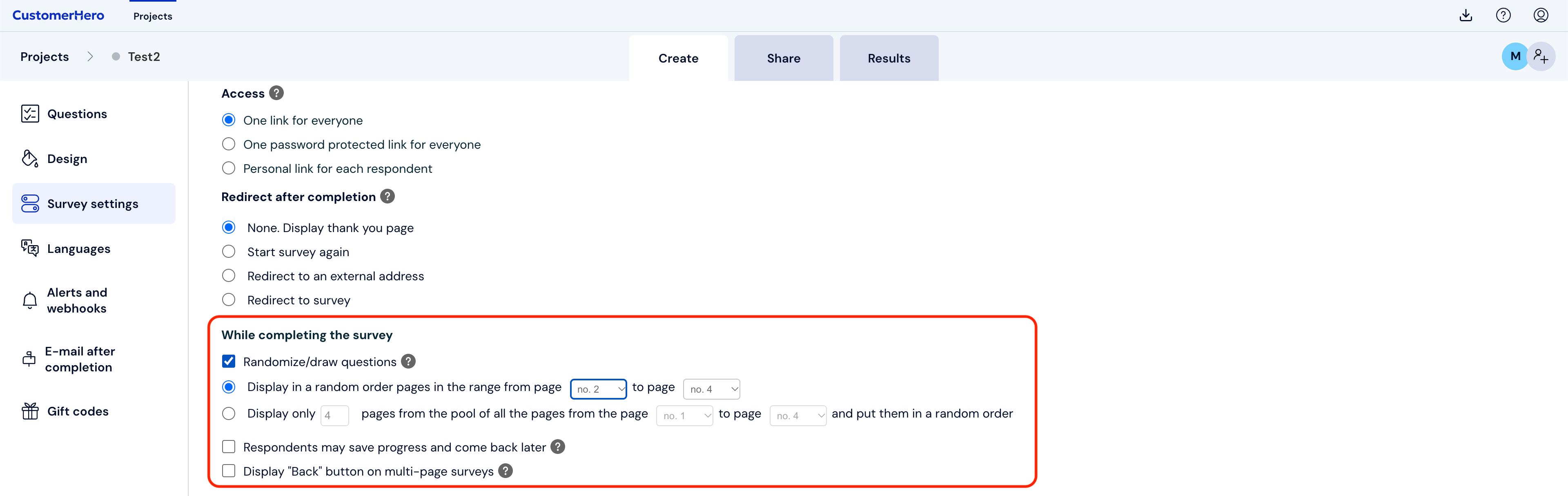
Scroll down to the While filling out section and check the Introduce a random element option.
Select the range of pages that will be displayed randomly or enter the page numbers from a given pool that are to be displayed and set in a random order.
Next, at the bottom of the page, select the SAVE button.
What is worth knowing?
You cannot direct respondents to pages displayed in a random order from filtering questions. For such a redirection to be possible, pages must be displayed in a fixed order.
It is possible to randomly display questions and answers within a question, which we mention in this article: https://help.customerhero.com/pl/support/solutions/articles/206000086261-losowe-wy%C5%9Bwietlanie-pyta%C5%84-i-odpowiedzi-w-kafeterii