
Automated Tagging and Sentiment Analysis AI of Open-Ended Responses
The automatic comment analysis process in CustomerHero transforms unstructured text data into measurable insights, essential for making quick business decisions. By using advanced Natural Language Processing (NLP) models, the system autonomously categorizes customer feedback and assesses its emotional tone.
How does the analysis process work?
The algorithm's operation consists of three main stages that guarantee high data quality and complete information security.
Step 1: Scope definition and input data filtering
The first stage prepares raw comments for effective processing by artificial intelligence models.
- Codebook (Tags): The system relies on a dedicated list of thematic categories crucial for your business (e.g., "Customer Service", "Price", "Delivery", "Ease of Purchase"). They form the backbone of the categorization.
- Information noise reduction: Only substantive feedback is analyzed. The system automatically rejects comments shorter than 10 characters (e.g., "OK", "thanks"), which significantly improves the quality of final reports.
Step 2: Server-side data anonymization (GDPR compliance)
Before any text reaches the language models, it undergoes a rigorous anonymization process on CustomerHero/GetFeedback servers. No sensitive customer data leaves our secure infrastructure.
- Structured data (Regex): Information with a fixed format (National ID, phone numbers, e-mail addresses, card numbers, IBAN) is immediately captured and removed using regular expressions.
- Contextual data (NER): To recognize first and last names in text, we use the advanced Named Entity Recognition technique, based on the Hugging Face Transformers library.
- Placeholders: All removed personal data is replaced with secure tags (e.g.,
[imie],[adres email]), preserving the natural context of the sentence for the artificial intelligence.
Step 3: Sentiment analysis and thematic tagging
The fully anonymized text goes to the AI engine, which analyzes it both substantively and emotionally.
- Tag matching: The AI model reads the comment and precisely marks text fragments corresponding to tags from the previously defined codebook.
- Sentiment assessment: Each assigned tag receives a specific tone: positive, neutral, or negative. Thanks to this, you know not only what customers are writing about but also whether a given area (e.g., delivery time) causes their frustration or satisfaction.
What does the analysis look like in the CustomerHero dashboard?
The results of the algorithms' work are presented in the dashboard in a clear manner, ready for immediate interpretation:
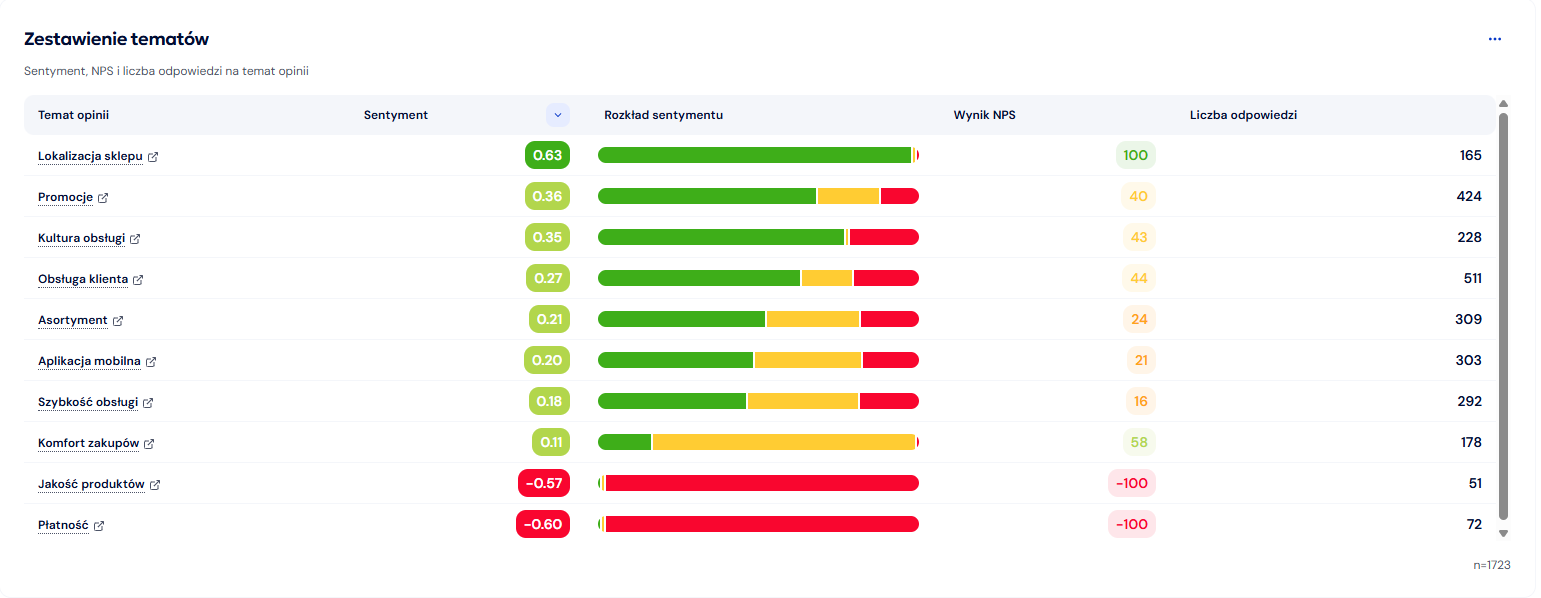
- Aggregated analytical view: In the reports section, you will see a summary in the form of charts. Tags are arranged by popularity, and each of them has a sentiment proportion indicator (e.g., a green bar for positive reviews and a red one for negative ones within the "Customer Service" tag).
- Single response view: When browsing a specific comment, you will see text fragments highlighted by AI. Next to the highlight, the assigned tag and an icon/color indicating sentiment are displayed.
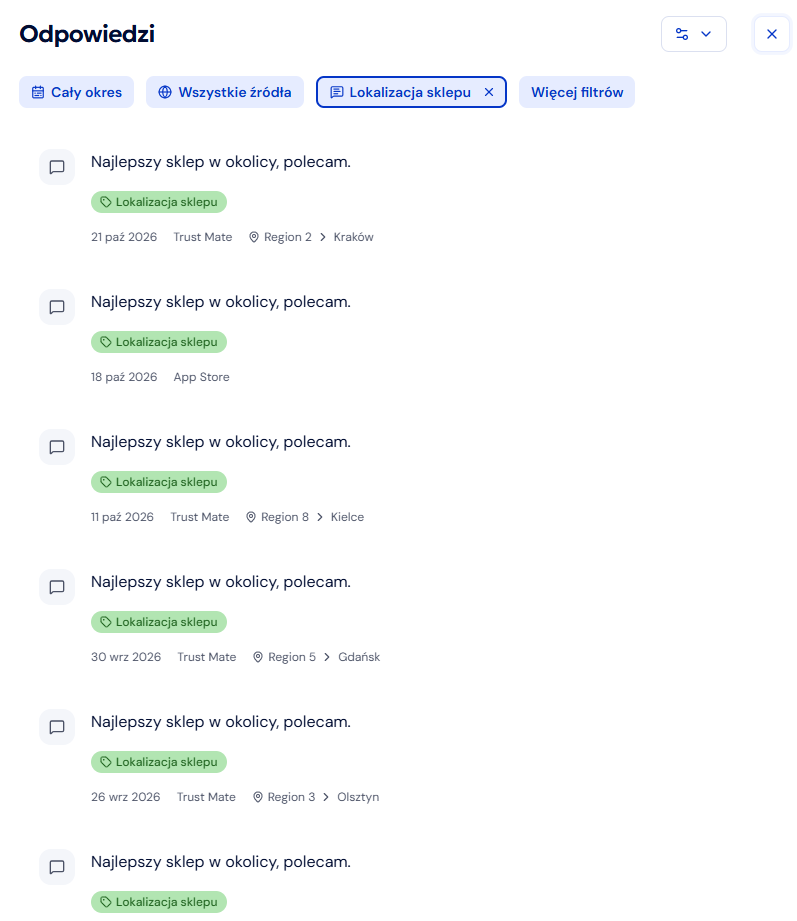
- Filtering: You can easily narrow down the response view by selecting a specific tag and sentiment of interest from the list (e.g., display only negative feedback regarding the "Price" tag).
Technological flexibility of AI models
By default, CustomerHero uses optimized OpenAI models. However, our architecture allows for full flexibility. Depending on your company's security policy and technological strategy, we can integrate the system with other cloud solutions (e.g., Google Gemini Cloud) or connect a private, internal AI model hosted directly in your infrastructure.
Detailed comment anonymization process
As mentioned in Step 2 of our analysis process, data security and the privacy of your customers are our highest priorities. Below we have prepared a detailed, technical overview of the anonymization process. You will learn exactly how our proprietary system works, ensuring full compliance with GDPR before transferring any information for final AI analysis.
Introduction and Purpose of the Process
The main goal of the algorithm is the anonymization of personal data contained in the text responses of respondents, collected through open-ended survey questions. This process is crucial for maintaining privacy and ensuring compliance with regulations. It is also an essential step before sending anonymous comments to Large Language Models (LLMs) for automatic tagging, classification, and sentiment analysis.
Processing Location
The algorithm runs on the server-side (backend) in Python. It operates in offline (asynchronous) mode on a dedicated, secure infrastructure belonging to GetFeedback (CustomerHero). This ensures that no customer data ever leaves our internal infrastructure.
How the Anonymization Script Works
The script works by precisely searching for personal data patterns within the raw text, then removing and replacing them with an appropriate, predefined placeholder (label).
Data Search Methods
The method of identifying data varies depending on the type of information being searched for:
| Data Type | Identification Method | Library/Tool |
|---|---|---|
| First Name, Last Name | Named Entity Recognition (NER) | Hugging Face Transformers (PyTorch) |
| E-mail, Numbers (National ID, Card, IBAN, Phone, ID Card) | Matching with defined Regular Expressions (Regex) | Standard Python/PHP functions |
Personal Data Detection using Regular Expressions (Regex)
Searching for strings of numbers and characters with fixed or easily definable formats is done using precise regular expressions (regex). This is the simplest and most reliable method for structured data.
| Data Type | Regular Expression (Regex) | Placeholder |
|---|---|---|
| National ID (PESEL) | /\b\d{11}\b/g | [pesel] |
| ID Card Number | /\b[a-zA-Z]{3}[-\s]?\d{6}\b/g | [nr dowodu] |
| Bank Account Number (IBAN) | /\b(PL)?\d{2}(?:\s?\d{4}){6}\b/g | [nr rachunku bankowego] |
| Payment Card Number | /\b(?:\d{4}[-\s]?){3}\d{4}\b/g | [nr karty] |
| Phone Number | /\b(?:\+?48[\s]?)?(?:\d[\s]?){7,11}\b/g | [nr telefonu] |
| E-mail Address | /[a-z0-9!#$%&'*+/=?^`{|}~-]+(?:\.[a-z0-9!#$%&'*+/=?^`{|}~-]+)@(?:[a-z0-9](?:[a-z0-9-][a-z0-9])?\.)+[a-z0-9](?:[a-z0-9-]*[a-z0-9])?/g | [e-mail] |
First and Last Name Detection using NER
Due to the unstructured nature of first and last names (their identification requires understanding the context of the sentence), an advanced machine learning technique is used.
1. The Role of Named Entity Recognition (NER)
NER (Named Entity Recognition) is a Natural Language Processing (NLP) technique that automatically identifies and classifies expressions referring to real-world objects (called entities) in text.
- Application in the process: The script uses a language model (LLM) to tag text fragments as "Person" entities (e.g., First Name, Last Name, Job Title). This is the only way to effectively analyze and understand the context of the language at a sufficiently high level of precision.
2. Using the Hugging Face Transformers Library
The Hugging Face Transformers library (with the PyTorch or TensorFlow engine) is used to implement the NER model.
- Transformers: This is a leading open-source library that provides thousands of pre-trained models for NLP tasks. Using a model from this library (often BERT, RoBERTa, or similar, trained on large language corpora) allows for high accuracy in identifying PII (Personally Identifiable Information).
- Security: The library is installed and run on GetFeedback's internal servers, which is crucial for our security policy. This ensures data processing within a controlled infrastructure, eliminating the risk of data leaks to external services.
Replacing data with placeholders (Anonymization)
After identification, the original content (e.g., first and last name or phone number) is removed and replaced with an appropriate substitute label, according to the list below.
| Placeholder | Original Data |
|---|---|
| [imie] | First Name (e.g., Anna) |
| [nazwisko] | Last Name (e.g., Nowak) |
| [imie i nazwisko] | First and Last Name (if both are detected) |
| [adres email] | E-mail address |
| [nr telefonu] | Phone number |
| [nr karty] | Payment card number |
| [nr rachunku bankowego] | Bank account number (IBAN) |
| [pesel] | National ID Number (PESEL) |
| [nr dowodu] | ID card number |
Example Output:
- Original Text: "Please contact me at anna.nowak@firma.pl or call 123-456-789. I visited the branch in Krakow."
- Anonymized Text: "Please contact me at [e-mail] or call [nr telefonu]. I visited the branch in Krakow."
Data Pipeline Flow
- Input Data: Respondent's text response (raw text) on the GetFeedback server side.
- Step 1: Structured Data Identification (Regex):
- Running a script with Regular Expressions (Regex) to identify numbers (National ID, Card, IBAN, Phone, ID Card) and e-mail addresses.
- The found text fragments are immediately removed and replaced with appropriate placeholders (
[nr telefonu],[adres email], etc.).
- Step 2: Contextual Data Identification (NER/LLM):
- The remaining, partially anonymized text is passed to a locally hosted Hugging Face Transformers (NER) model.
- The model identifies "Person" entities (First Names, Last Names, Initials).
- The identified first/last names are removed and replaced with placeholders (
[imie],[nazwisko]).
- Step 3: Output Data (Anonymized Text):
- The fully anonymized text is saved in the database.
- The text is ready for further processing by LLMs (tagging, sentiment) or for display on dashboards.