Prioritization Analysis in Feedback HUB
Impact Performance Matrix vs Key Driver Analysis
Every CX research program must at some point answer one key business question: "What pulls our score up the most, and what pulls it down?".
In Feedback HUB, we provide you with two separate analyses that help you determine priorities for improvement. Although they are sometimes confused with each other, their names, applications, and the type of data analyzed are strictly defined:
- Impact Performance Matrix (and Tag Impact on KDM) – analyzes the impact of a TAG (a theme detected in open-ended comments) on the Key Driver Metric (KDM).
- Key Driver Analysis (KDA) – analyzes the impact of a SINGLE CLOSED QUESTION (a driver from a structured survey) on the KDM.
Below you will find a detailed overview of both methods, how they work, and how to interpret the results.
1. Tag Impact on KDM and Impact Performance Matrix (Text Analysis)
The goal of this analysis is to indicate which topics from open-ended comments have a real impact on your KDM score (e.g., NPS, CSAT, CES). It focuses not only on what is popular, but on what statistically and genuinely affects the final score.
How do we calculate it? ("Tag Impact" Table)
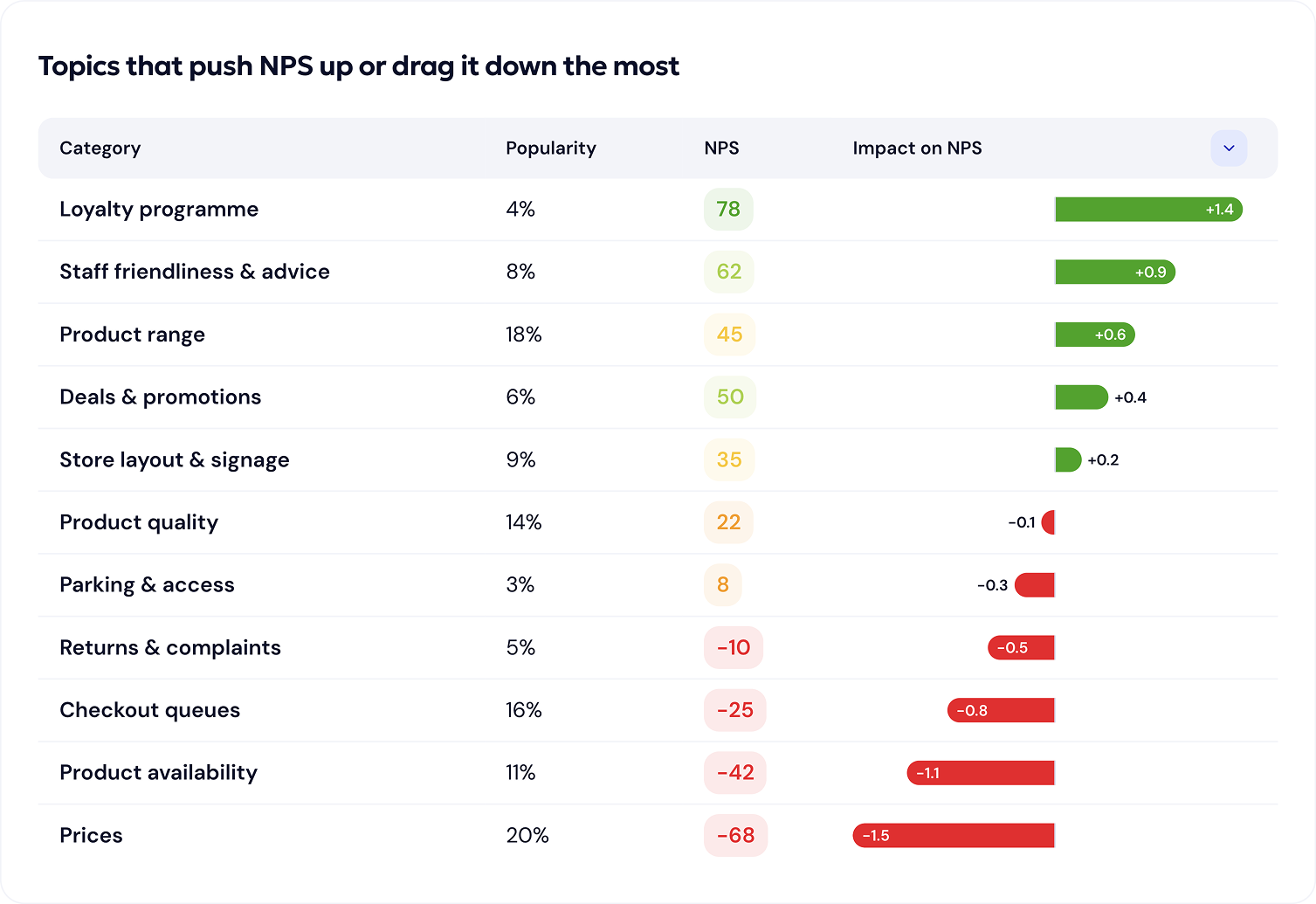
The analysis is available in tabular form, where the columns include Category, Popularity (%), KDM, and Impact on KDM (presented as a diverging bar: red for negative, green for positive values in percentage points).
The calculation formula is universal for every metric:
Tag Impact (in p.p.) = (Tag KDM − Overall KDM) × Tag share in surveys
(where Tag share = number of surveys with a given tag / total number of surveys).
By default, the table is sorted descending by popularity (consistent with the basic tag analysis), but you can sort it by Impact so that the most important priorities instantly bubble up to the top.
⚠️ Important limitations of the method:
- Sentiment vs. impact: The formula takes volume and rating into account, but it does not inherently translate the text's sentiment. A topic may have a positive impact on the overall KDM, yet not all comments within it are positive. Therefore, this analysis should always be combined with basic tag and sentiment analysis.
- Multi-topic comments: When a respondent raises several topics in a single comment, assigning their full KDM score to each of these tags loses precision. In the case of highly detailed, multi-topic comments, the Sentiment column is a more accurate indicator of the customer's true feelings than the calculated "KDM per tag".
Impact Performance Matrix (Matrix View)
This is exactly the same analysis as described above, but presented as a 2D chart. It allows you to identify priorities at a glance, without needing to read the table row by row.
To keep the chart readable (so it doesn't get cluttered with small bubbles), we recommend an entry threshold of 10–25 of the most frequent tags (about 1% share of mentions). Less frequent topics go into a separate "long tail" analysis.
How to read the IPM chart?
- X-Axis (Sentiment): The average sentiment of the tag (from -1 to 1). This tells you the tone customers use when talking about a given topic, regardless of their numerical KDM rating.
- Y-Axis (Impact): The result of the KDM formula described above.
- Bubble Size (Volume): Scaled by surface area. A large bubble high on the Y-axis immediately catches the eye as a key area.
The dividing lines on the chart represent the median of the X and Y axes for the displayed set of tags (the layout is dynamically recalculated for a specific study). The chart is divided into zones:
- Top Left (Low sentiment + high impact): Priority! Areas requiring immediate improvement.
- Top Right (High sentiment + high impact): Strengths. Areas to nurture and promote.
Bottom Corners (Low impact): Topics to monitor. These are not business priorities right now.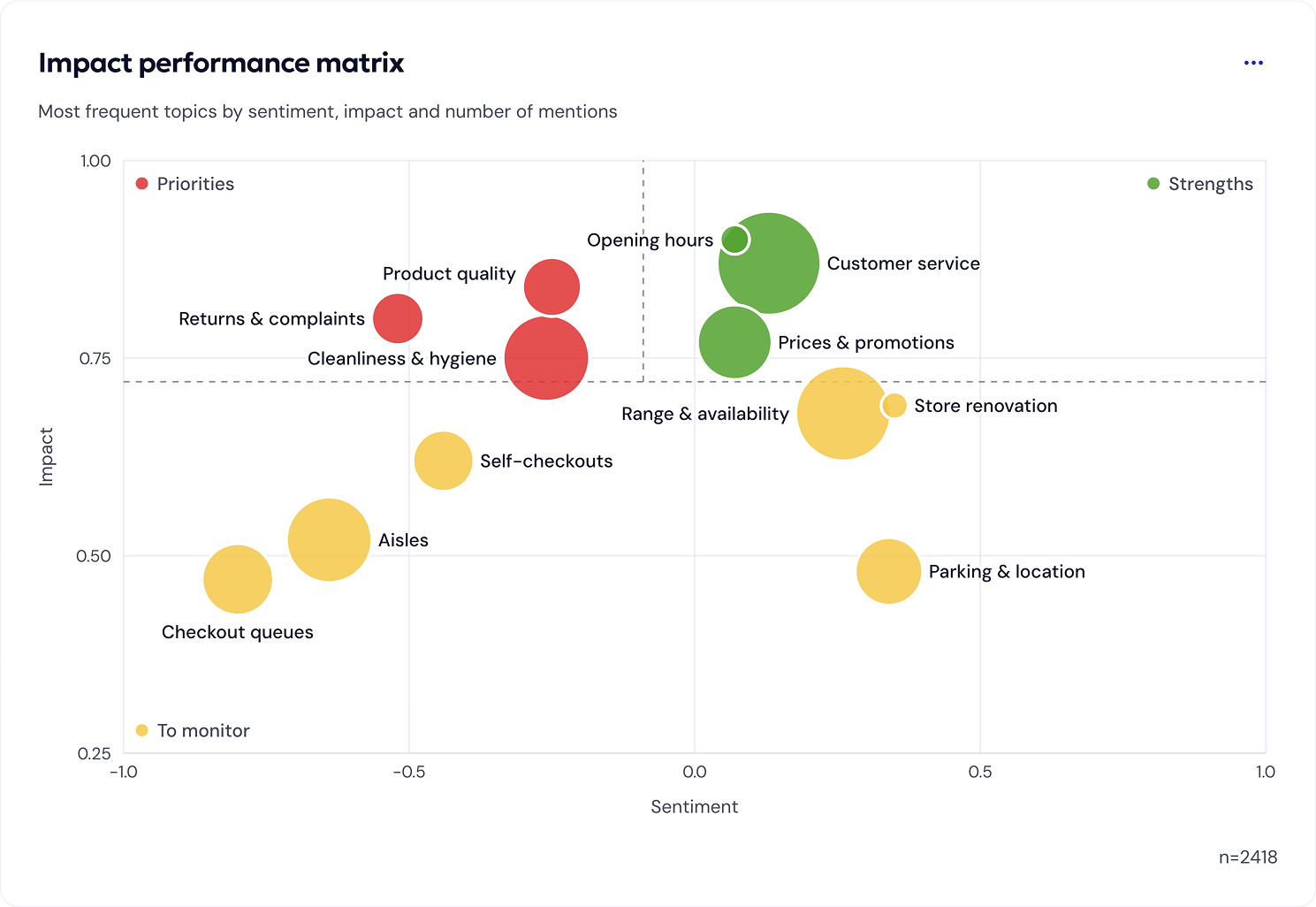
2. Key Driver Analysis (Structured Data Analysis)
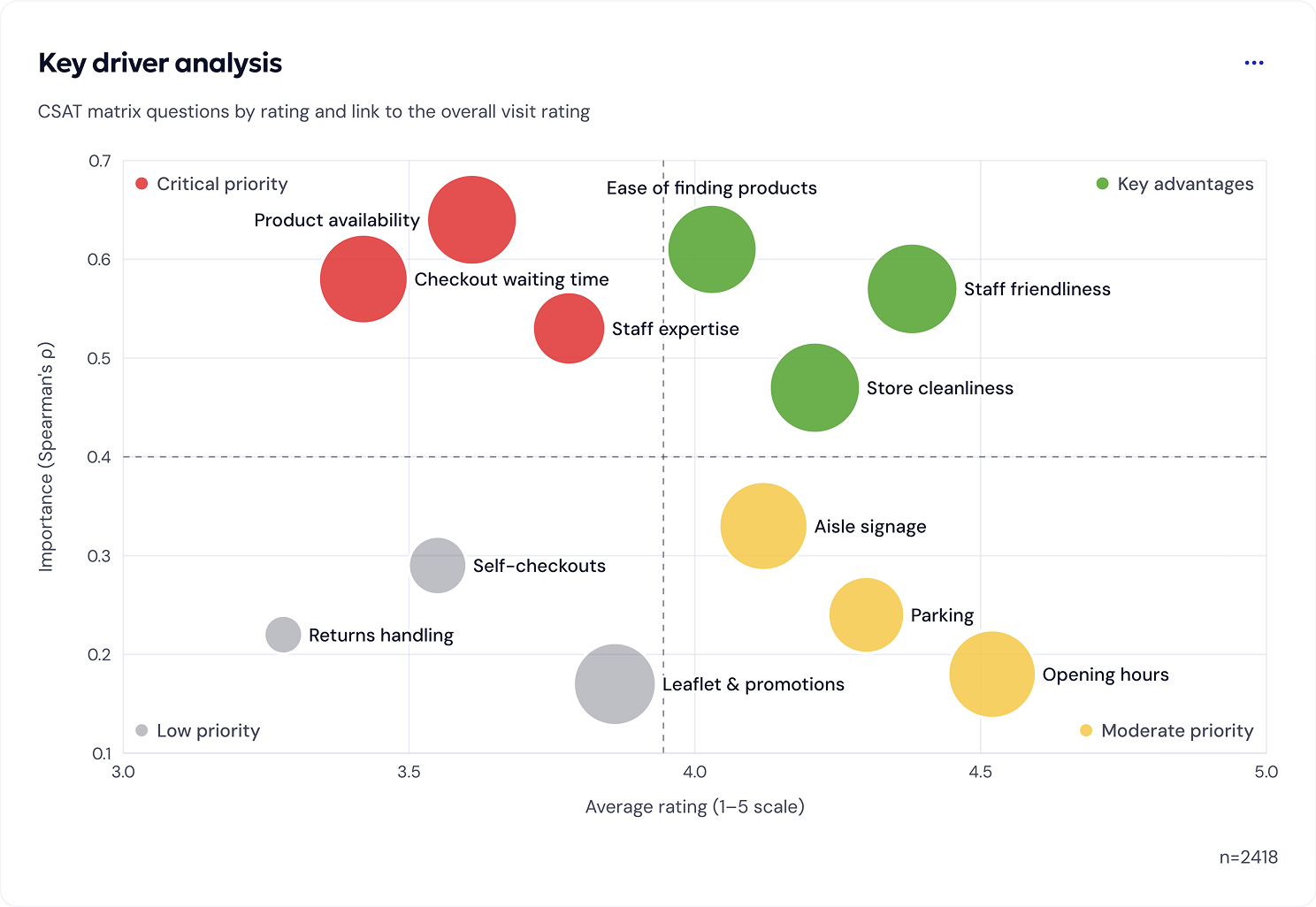
Key Driver Analysis (KDA) answers the same question as IPM ("what impacts the score the most?"), but it is based on data from closed, structured questions (so-called drivers), rather than text analysis. It is the most accurate method for surveys where you directly ask customers to rate specific aspects.
Configuration and operation
To generate the KDA chart, you must first specify:
- Explained variable (KDM): Your outcome metric for a given touchpoint.
- Driver pool: This can be the entire matrix of CSAT/SAT-NET questions, or selected individual questions you want to test. These will become the points on the chart.
How to read the KDA chart?
- X-Axis (Performance): The weighted average of ratings for a given driver.
- Y-Axis (Importance): Spearman's rank correlation between the driver's rating and the respondent's raw KDM score. We use Spearman's correlation (and not Pearson's) because Likert scale ratings are ordinal.
- Bubble Size (Volume 'N'): The number of valid (non-"N/A") responses. This is especially useful when some customers skipped certain steps of the journey. Bubbles are scaled dynamically by surface area.
- Dispersion (Driver Range): Additionally, the system collects the minimum and maximum value for each driver (visible e.g., as a whisker/error bar or in a tooltip), which shows the polarization of ratings.
Similar to IPM, the quadrant dividing lines are determined by the median of the X and Y axes of the tested driver set, adapting to the specifics of the given study.
Interpreting KDA Quadrants:
- Top Left (Low performance + high correlation): Critical priority. These elements strongly drag down the overall score and must be addressed immediately.
- Top Right (High performance + high correlation): Key advantages. They perform well and strongly drive the score – monitor them to maintain this status.
- Bottom Right (High performance + low correlation): Moderate priority. They work great, but have little impact on the final score. Monitor them, but do not invest additional budgets here.
- Bottom Left (Low performance + low correlation): Low priority. Rated poorly, but fortunately, customers do not attach much weight to them. You can ignore them in the first round of improvements.
By utilizing both analyses – Impact Performance Matrix to capture the context from your customers' own statements and Key Driver Analysis to mathematically confirm the weights for defined processes – you gain a complete picture of what the organization should focus its efforts on first.